
设备设置
以下设备设置可用于TC Bar。
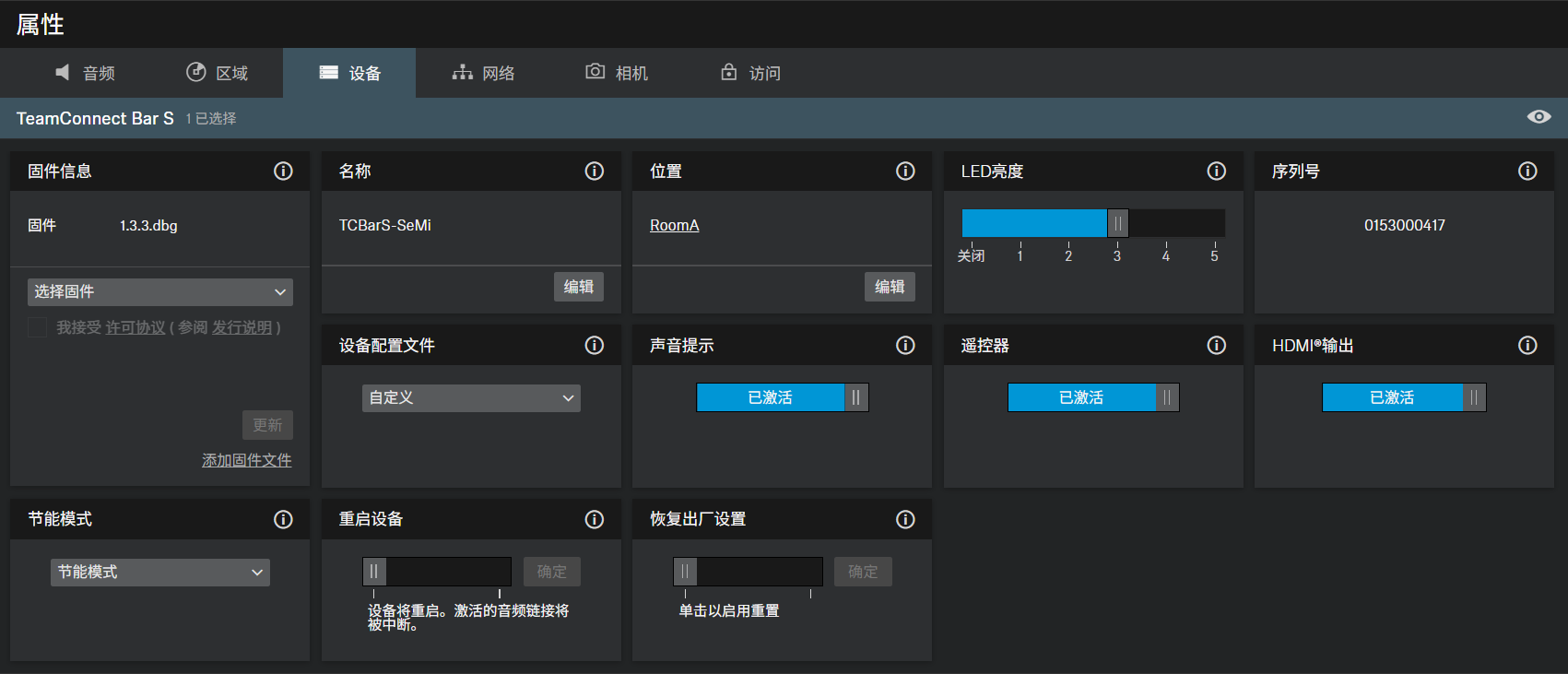
Firmware Info
Displays the current firmware version.
For information on how to update the firmware, refer to 更新设备固件.
Name
Edits the name of a device. The name will be stored on the device. If you change the name on the device itself, it will be displayed here accordingly.
Location
Sets the location of the selected device.
The field is limited to 255 bytes length including any UTF-8 characters.
LED Brightness
Slider for adjusting the LED brightness.
- Off: the LEDs are switched off completely
- 1 ... 5: adjusts the brightness between low (1) and high (5)
Serial Number
Displays the serial number.
设备配置文件
在此,可以选择所需的设备配置文件,该配置文件可应用于您自己配置的设置或所选会议和协作平台的预定义设置中。
更改设备配置文件时,将重置相机设置,并重新启动设备。
- 自定义:自己的设备配置文件。
- 启用相机选项卡中的所有设置以及设备选项卡中的HDMI输出
- Microsoft Teams:由Microsoft Teams预定义使用此配置文件,TC Bar的相机缩放将减小,以符合Microsoft Teams规范。
- 启用Microsoft Teams的默认设置
- 重置相机选项卡中的所有设置
- 禁用设备选项卡中的HDMI输出
- 重新启动设备
- 缩放:通过缩放预定义使用此配置文件,TC Bar的相机缩放可能会更改,以符合缩放规范。
- 启用缩放的默认设置
- 重置相机选项卡中的所有设置
- 重新启动设备
声音提示
激活或停用TC Bar的所有集成声音(迎宾曲除外)。
遥控器
启用或禁用TC Bar的红外遥控功能。
Device Restart
Restarts the selected device.
HDMI输出
激活传输至外部显示器的HDMI输出信号。
如果选择“Microsoft Teams”作为“设备配置文件”,则HDMI输出将被禁用。
节能模式
根据所需的可用性和响应时间,配置节能模式以满足TC Bar的使用场景需求。
有关进入特定待机模式的先决条件和最大功耗的详细信息,请参阅TC Bar手册中的“能耗状态信息”章节。
- 低功耗模式(可选)
- 可选模式
- 设备进入深度休眠以降低功耗
- 需要手动开机唤醒设备
- 由于无网络连接,无法远程唤醒
- 节能模式(默认)
- 出厂交付状态的默认模式(固件 ≥1.3.0)
- 将设备置于低功耗状态,同时通过以太网保持可用性和快速响应
- 允许远程唤醒
- 始终开启模式(可选)
- 可选模式
- 建议用于必须全天候(24/7)可用于管理的设备
- 此模式需用户明确确认
- 设备将不再自动进入任何节能(ECO)模式
- 功耗不会降低
- 设备将始终保持运行并可随时访问
Factory Reset
All settings of the selected device are reset to the factory defaults.
The last saved status of the Location-based mute function
is retained even after you reset the device to the factory default.