
Danger of Network Loop
A network loop occurs when a network has more than one active path carrying information from the same source to the same destination.
The information loops and amplifies itself using the additional path instead of stopping when it reaches its destination. Network loops might cause a slow, irregular Internet connection or network failure.
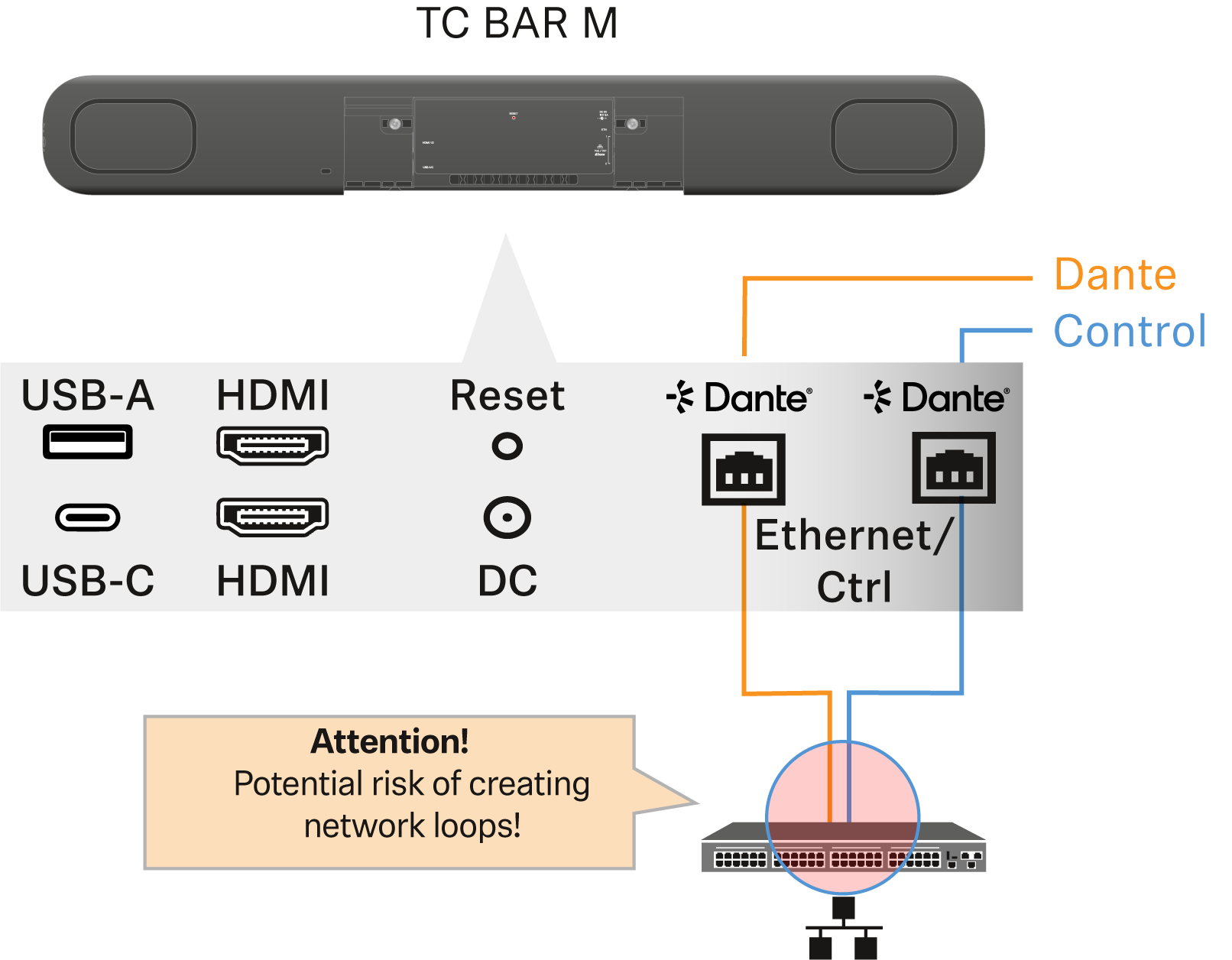
Examples:
- Both cables coming from the two ports of the TC Bar M are
plugged into the same network switch (TC Bar M only):
- In Split Mode, make sure you always connect the TC
Bar M to two different networks that do not run via a common switch.
- Ethernet I: Sennheiser control software
- Ethernet II: Dante® network
- Using the device in Dual or Single Domain Mode, all signals are forwarded from one port to the other. The intended use is to build a daisy chain to feed incoming signals to, for example, attached external microphones.Make sure you do not connect both cables directly to the same switch, as this creates a direct loop!
- In Split Mode, make sure you always connect the TC
Bar M to two different networks that do not run via a common switch.
- Both internal interfaces, Control and Dante, are connected
to the same domain:
- Use separate domains for each interface, depending on
the mode in use:
- Bar S: Dual Domain Mode
- Bar M: Dual Domain Mode and Split Mode
- Use separate domains for each interface, depending on
the mode in use: