
Access
Here you can manage third-party access and device access.
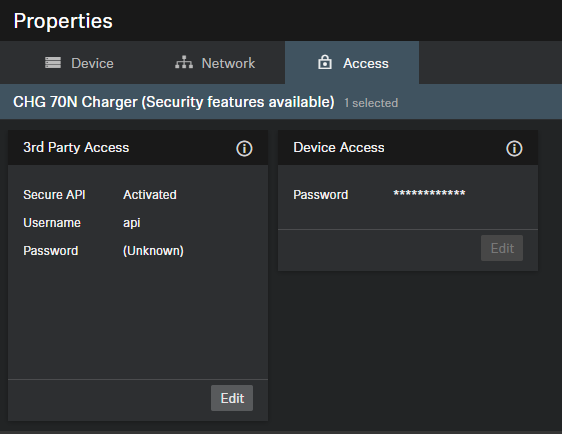
Third-Party Access
The 3rd party media control access for CHG 70N(S) chargers is encrypted and protected using username and password. It has to be enabled using Control Cockpit before use.
- Enables or disables 3rd party media control access. In order to enable, select the Edit button, activate the toggle switch, enter a 3rd party device password and select the OK button.
- You can use the username api and configured password for your API calls.
If you deactivate 3rd party access, the previously set
password will be deleted.
Please note that the new password must meet the following
requirements:
- At least ten characters
- At least one lowercase letter
- At least one uppercase letter
- At least one number
- At least one special character: !#$%&()*+,-./:;<=>?@[]^_{|}~
- Maximum length: 64 characters
Device Access
Changes the password for device access, used by Control Cockpit to authenticate to the device.
Please note that the new password must meet the following
requirements:
- At least ten characters
- At least one lowercase letter
- At least one uppercase letter
- At least one number
- At least one special character: !#$%&()*+,-./:;<=>?@[]^_{|}~
- Maximum length: 64 characters