Jump to main content
Spectera
Spectera
3rd Party API AVX Control Cockpit Digital 6000 Evolution Wireless Digital Profile Wireless Spectera Solution SpeechLine Digital Wireless TeamConnect Bar TeamConnect Ceiling Medium TeamConnect Ceiling 2 Wireless System Manager ...alle anzeigen
  • Quick start
  • Product information
  • User manual
  • Knowledge base
  • Specifications
  • Contact
  1. Home
  2. User manual

    Detailed description of the start-up and operation of your selected hardware.

  3. Modular L 6000 charger

    These sections contain information about installing, starting up and operating the modular L 6000 charger and the corresponding charging modules.

  4. Product overview
  • User manual

    Detailed description of the start-up and operation of your selected hardware.

    • Base Station
    • SEK
    • DAD
    • CHG 70N-C charger

      The CHG 70N-C is a network enabled charger featuring two individual charging bays.

    • L 70 USB charger
    • Modular L 6000 charger

      These sections contain information about installing, starting up and operating the modular L 6000 charger and the corresponding charging modules.

      • Product overview
      • Connecting/disconnecting the L 6000 to/from the power supply system
      • Connecting the L 6000 to a network
      • Installing a charging module in the L 6000 charger

        The following charging modules are available for the L 6000 charger.

      • Installing the L 6000 in a rack

        You can install the L 6000 charger in any conventional 19" rack.

      • Switching the L 6000 on and off

        The L 6000 does not have a separate on/off switch.

      • Charging the rechargeable batteries in the L 6000 charger
      • Meaning of the LEDs
      • Preparing rechargeable batteries for storage (storage mode)
      • Resetting settings (factory reset)
      • Updating the firmware
      • Operating the L 6000 via a network
    • Cleaning and maintenance

      Note the following information when cleaning and maintaining products of the Spectera series.

Product overview

Front
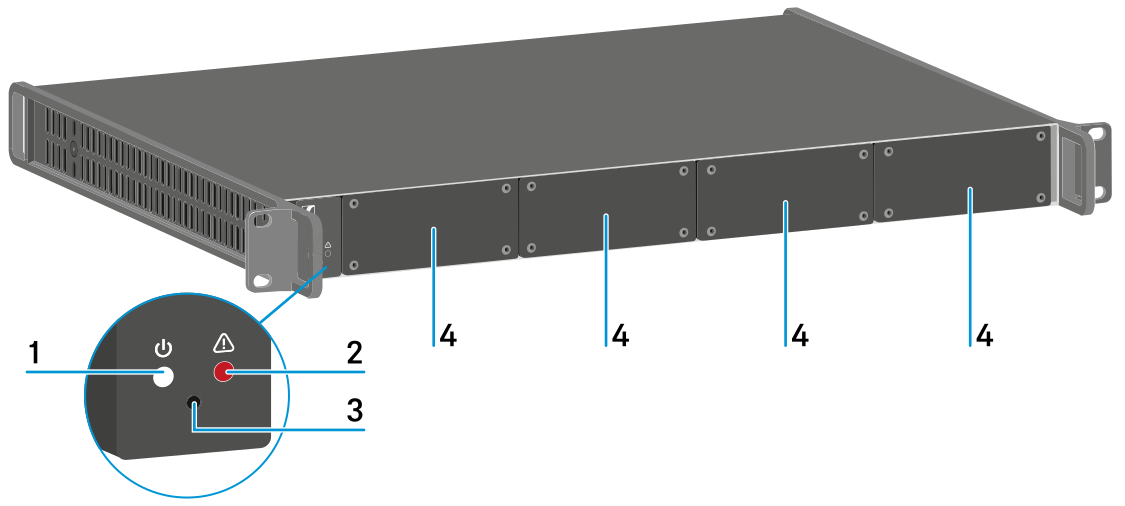


1 Power status LED
See Meaning of the LEDs
2 Warning status LED
See Meaning of the LEDs
3 Reset
See Resetting settings (factory reset)
4 Dummy caps
See Installing a charging module in the L 6000 charger

Back


1 Power socket
See Connecting/disconnecting the L 6000 to/from the power supply system
2 Ethernet socket
See Connecting the L 6000 to a network
On this page
  • Front
  • Back
v1.2 | 11/2025
English Deutsch Français Español Português 简体中
© Sennheiser electronic SE & Co. KG | Am Labor 1 | 30900 Wedemark | Germany
Wählen Sie hier Ihre Sprache aus