
Pairing/unpairing mobile devices
In the WebUI, you can pair up to 128 mobile devices to a Base Station within one RF channel.
Mobile devices can only be paired and operated with one Base Station at a time. If a mobile device is to be used with another Base Station, it must first be paired again.
Please unmute at least one RF channel before pairing if this was not done automatically.
To pair a mobile device:
-
Switch on your mobile device and activate Pairing Mode if it has not been activated automatically (Switching the SEK on and off).
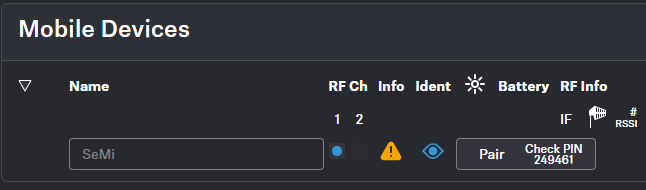
After a few seconds, the available mobile devices are displayed in the list below under Mobile Devices. A verification PIN is displayed on the mobile device and in the WebUI.
-
Verify the PIN on the mobile device and click on Pair.
The mobile device has been paired successfully. The device state color changes to:
 green (successfully paired)
 gray (assigned RF channel not on air)
 yellow (firmware mismatch) or
 red (unconnected, no RF channel selected, not available)
To unpair a mobile device:
To unpair a paired device, the audio links must first be deactivated.