
网络设置
以下网络设置可用于TC Bar。
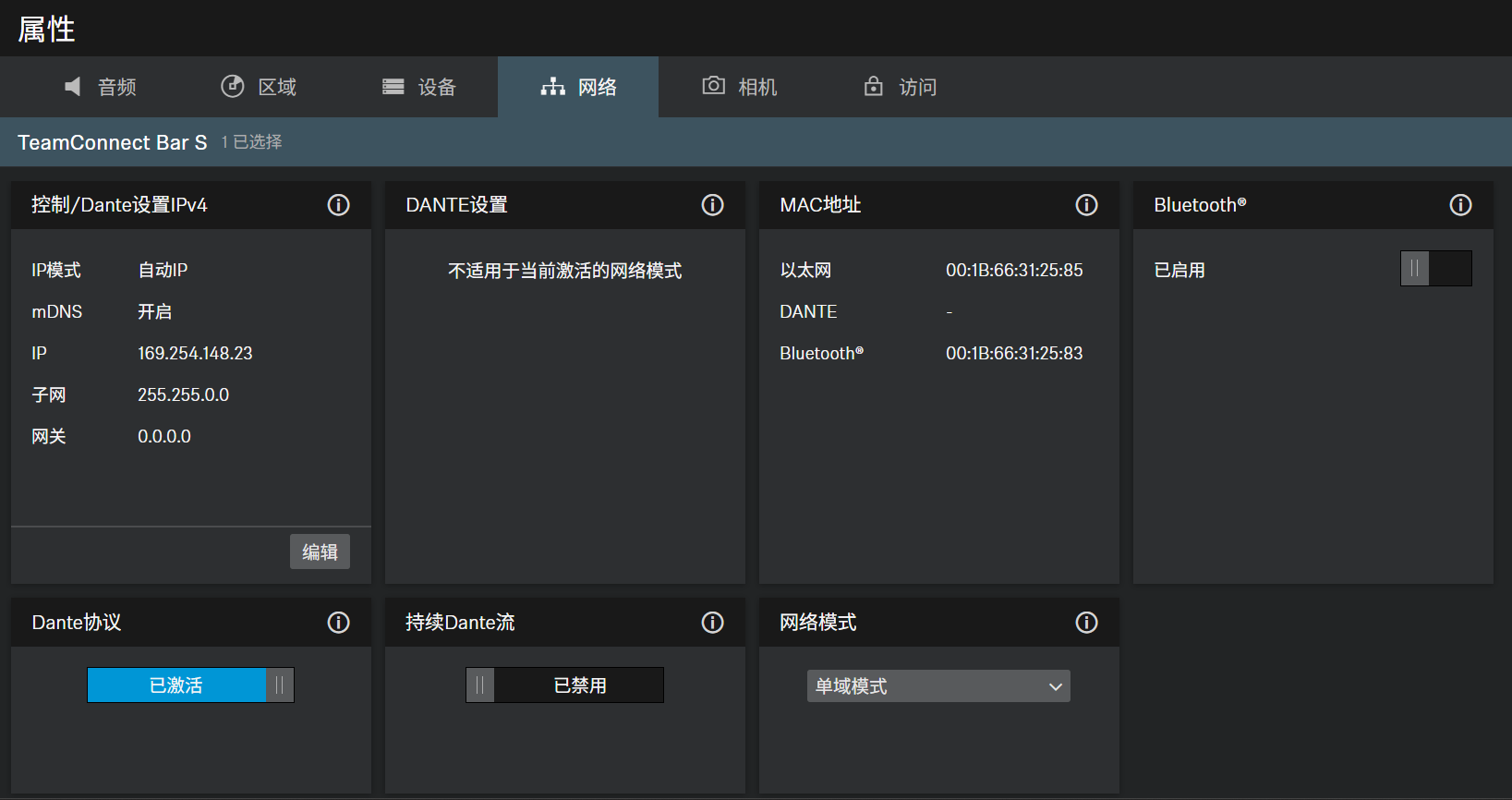
Control/Dante Settings IPv4
- Automatic: The IP address is automatically assigned using DHCP. If no DHCP server is available, the IP address is assigned by the SL Rack Receiver DW itself.
- Fixed IP: The IP address has to be entered manually.
- Off: Deactivates mDNS to reduce the data volume transferred across the network. This option is recommended for larger systems.
- On: Activates mDNS to allow for automatic device detection. This option is recommended for smaller systems with up to 30 devices.
- Input of the IP address in Fixed IP mode.
- Input of the subnet mask in Fixed IP mode.
- Input of the gateway in Fixed IP mode.
Dante Settings
- Automatic: The IP address is automatically assigned using DHCP or Zero Configuration. If no DHCP server is available, the IP address is assigned by the TeamConnect Bar itself.
- Fixed IP: The IP address has to be entered manually.
- IP: Input of the IP address in Fixed IP mode.
- Subnet: Input of the subnet mask in Fixed IP mode.
- Gateway: Input of the gateway in Fixed IP mode.
- VLAN ID: VLAN ID field to be routed to the correct network (default = 100).
A VLAN separates a physical network into logical sub-networks. This enables several virtual networks to be created from one physical switch port. When using Dual Domain Mode, Dante® and Control Cockpit can be used separately. In case of Dante® network, this can be virtually separated and operated independently using a VLAN with just one network connection. The frames are given a tag containing a VLAN ID. This provides the switch port with information on which Dante® VLAN the frame belongs to.
MAC Address
Displays the unique MAC addresses of the device according to the connected ports.
蓝牙
Bluetooth默认已停用。要激活BT并将TC Bar连接到兼容BT的设备,请执行以下操作:
- 点击启用以激活BT功能,并等待约10秒,以便设备处理初始激活。
- 点击开始以开始配对过程。
- 在您的设备中,搜索您的TC Bar名称,然后点击连接。如果TC Bar不可见,请再次重复配对过程。
DANTE Protocols
Enables a digital audio network protocol over Ethernet for routing and synchronization of Dante-compatible devices using the Dante Controller software.
连续的 Dante® 流
- 启用通过 Dante® 持续传输麦克风流。音频数据将持续通过 Dante® 进行流式传输。这可能会增加功耗。请在启用前确保通过 Dante® 的持续音频流式传输符合您所在地区的安全和监管要求。
警告
网络模式
- 单域模式(TC Bar和TC Bar M的默认模式):
- 双域模式(适用于TC Bar S和TC Bar M)
- 拆分模式(仅适用于TC Bar M)
- 如果希望在同一网络中只有一个可用IP的同一物理端口上同时使用控制器(Sennheiser或第三方提供者)和Dante,通常使用此模式。要设置这两种配置,控制网络需要使用Sennheiser Control Cockpit,其他路由Sennheiser设备则需要使用Dante控制器。
- 如果希望通过一条网络线路接收到来自两个独立网络的合并流量,并且希望将此合并流量重新解析成两个不同的IP和MAC地址,则通常使用此模式。利用这种方式,可以通过同一个交换机独立地操作Dante网络和控制网络。
- 出站Dante®数据包将根据802.1q标准标记为VLAN(虚拟局域网)。入站数据包也必须由外部连接的网络进行标记,以便能够正确分配,以供内部使用。根据设备的不同,数据包可能需要通过托管交换机从出站802.1q标准转换为802.3。
拆分模式:
- 如果您通过一条网络线路接收到来自两个独立网络的混合信号,并希望将此混合信号重新解析成两个不同的IP地址,则通常使用此模式。利用这种方式,可以彼此独立地操作Dante网络和控制网络,并为每个网络使用单独的交换机。