Panorama function in stereo mode
FOCUS ON
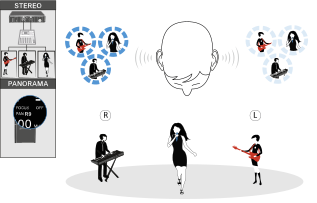
With the FOCUS ON setting, the two audio channels are added and arrive at the listener’s left and right ears as mixed mono signals.
The PAN function lets you adjust the mixing of the incoming mono signals.
Example:
There are two artists on stage. They are using the STEREO audio transmission mode. The audio signals from both artists are received by both receivers.
Artist B (vocals) changes the panorama value on her receiver and shifts the mixed mono signal to the right channel (PAN R9). With this setting, artist B hears only herself in both ears.
FOCUS OFF
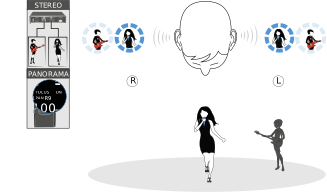
With the FOCUS OFF setting, the two audio channels arrive at the listener as mixed stereo signals.
You can use the PAN function to adjust the relative mixing of the stereo signals (comparable to controlling the volume of the right and left channels of the headphones).
Example:
There are multiple artists on stage. They are using the STEREO audio transmission mode on the transmitter. The mixed stereo signals from the mixing console are connected to both audio inputs of the transmitter. The mixed stereo signals from all artists arrive at all receivers.
Artist B (vocals) changes the panorama value to R9 and thus shifts the volume to the right (PAN R9). With this setting, artist B hears all artists but only in her right ear.